Error:
---------------------------
Rule Check Result
---------------------------
Rule "SQL Server Database Services feature state" failed.
The SQL Server Database Services feature failed when it was initially installed. The feature must be removed before the current scenario can proceed.
Fix:
Registry key needs to be modified on Active node.
HKEY_LOCAL_MACHINE\SOFTWARE\Microsoft\Microsoft SQL Server\MSSQL10.\ConfigurationStat
Change all values from 2 to 1 for all four item and run the rule check again.

Monday, 12 August 2013

Monday, 29 July 2013
Data collector - SQL Server 2008
Data collector is a
component of SQL Server 2008 used to collects different sets of data. It
is a core component of the data collection platform for SQL Server 2008
and the tools that are provided by SQL Server.
The data collector provides one central point for data collection across your database servers and applications. This collection point can obtain data from a variety of sources and is not limited to performance data.
Its stores the collected data in a relational database known as the management data warehouse, A relational database that enables you to manage the data that you collect by setting different retention periods for your data.
The data collector is integrated with SQL Server Agent and Integration Services, and uses both extensively. SQL Server Agent is used to schedule and run collection jobs.Integration Services (SSIS) is used to execute packages that collect data from individual data providers.
--------------------
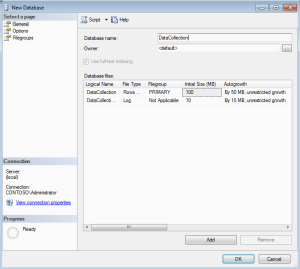
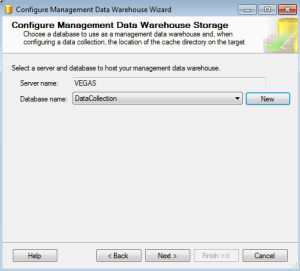
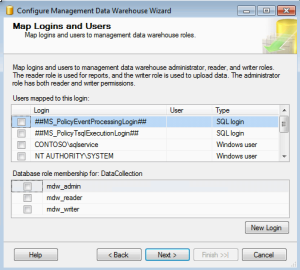
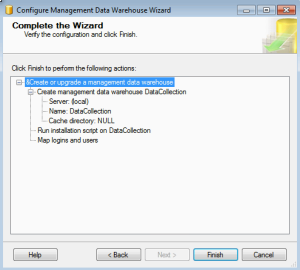
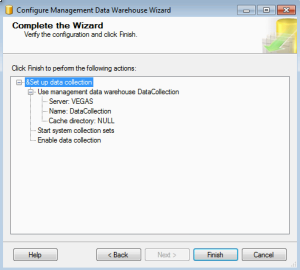
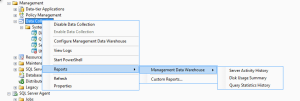
To Configure the management data warehouse using SQL Server Management Studio.
The data collector provides one central point for data collection across your database servers and applications. This collection point can obtain data from a variety of sources and is not limited to performance data.
Its stores the collected data in a relational database known as the management data warehouse, A relational database that enables you to manage the data that you collect by setting different retention periods for your data.
The data collector is integrated with SQL Server Agent and Integration Services, and uses both extensively. SQL Server Agent is used to schedule and run collection jobs.Integration Services (SSIS) is used to execute packages that collect data from individual data providers.
--------------------
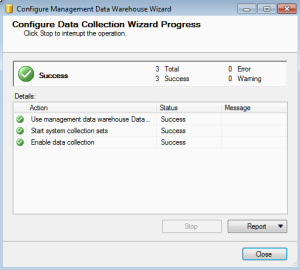
To Configure the management data warehouse using SQL Server Management Studio.
- Ensure that SQL Server Agent is running.
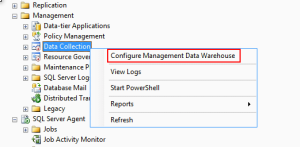
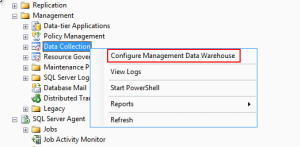
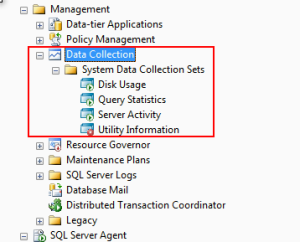
- In Object Explorer, expand the Management node.
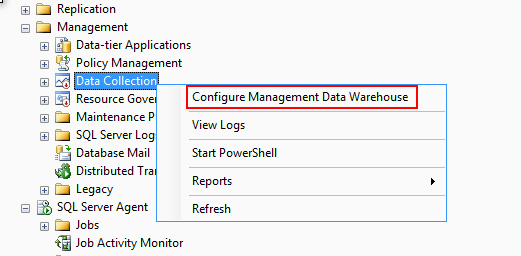
- Right-click Data Collection, and then click Configure Management Data Warehouse.
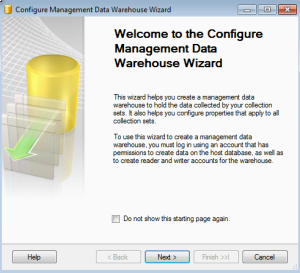
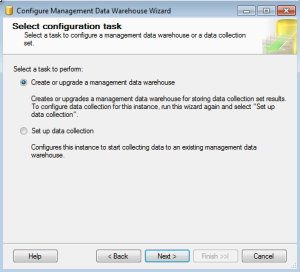
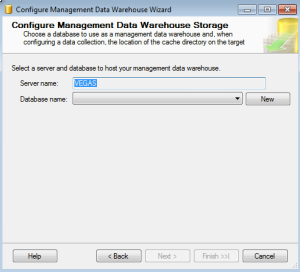
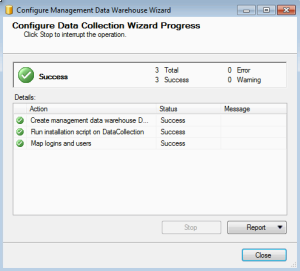
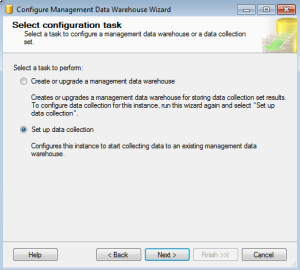
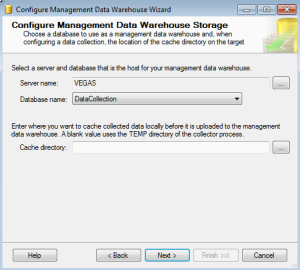
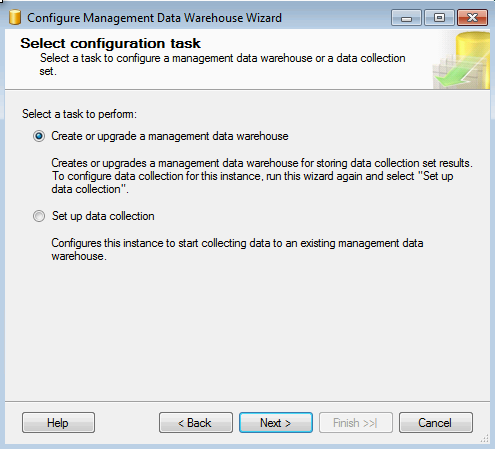
Use the Configure Management Data Warehouse Wizard to create a management data warehouse, configure logins, enable data collection, and start the System Data Collection Sets.



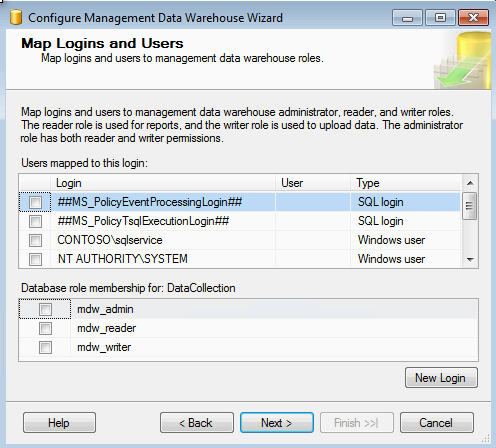
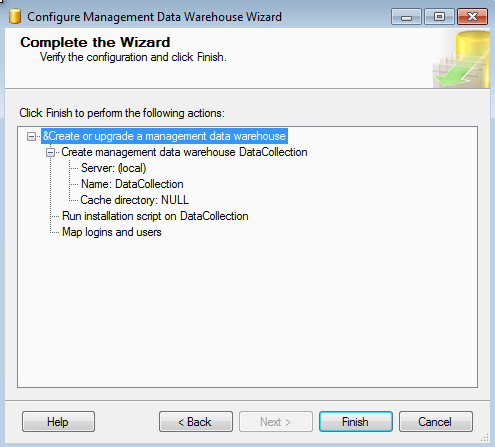
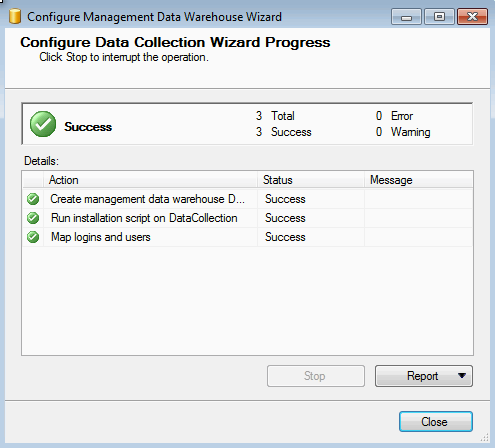

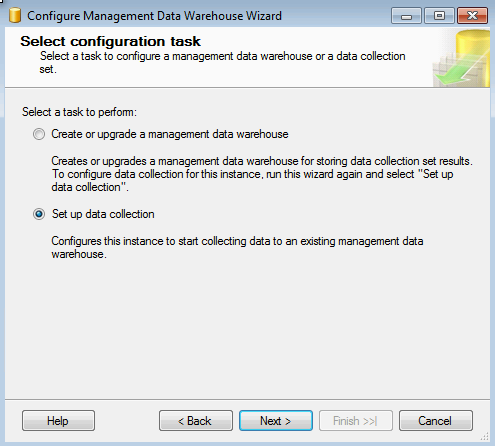

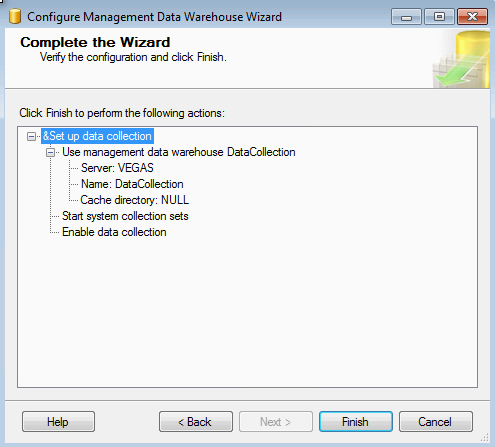

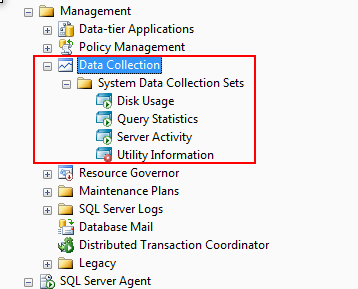
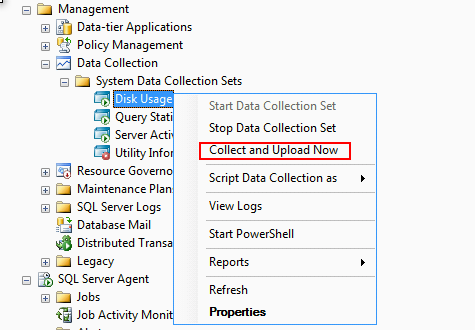

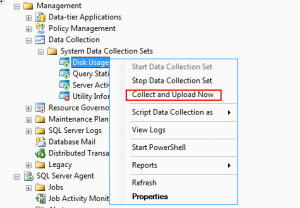
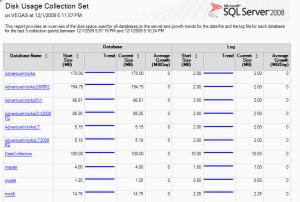
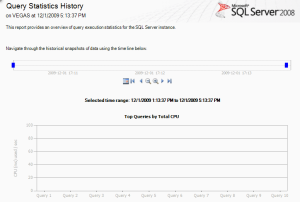
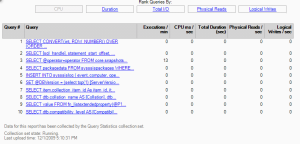
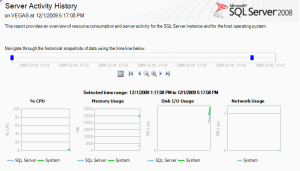
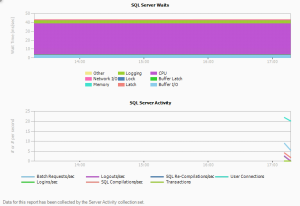
Here is some sample reports.
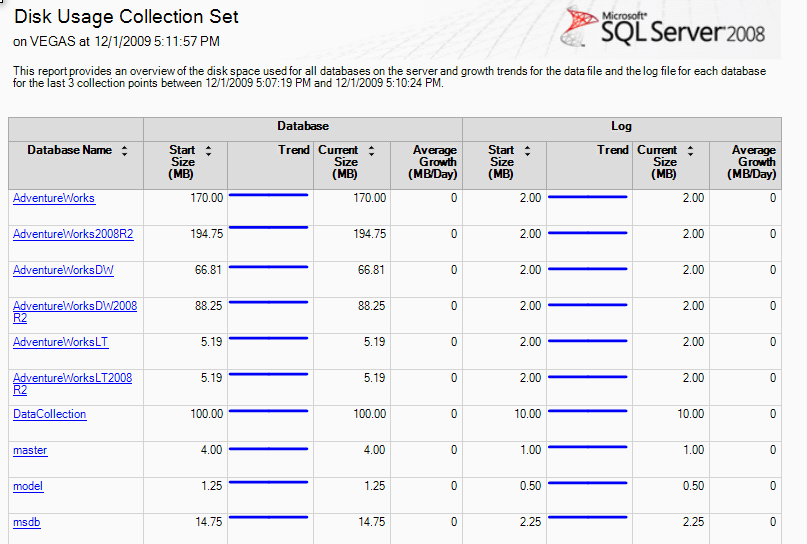


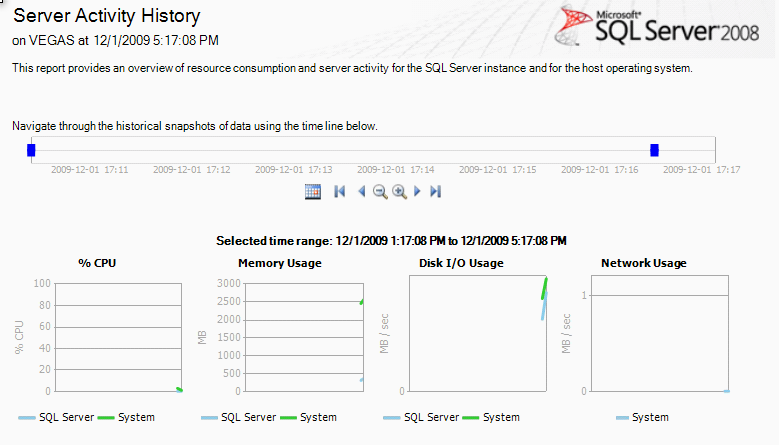

You can export the report in pdf or excel. This inbuilt tool is very easy to configure and monitor.
Thursday, 11 July 2013
Microsoft SQL Server Virtual Labs
Try Microsoft SQL Server in a virtual lab and learn more about AlwaysOn, ColumnStore Index, PowerView, and other new features. Virtual labs are simple, with no complex setup or installation required.
SQL Server 2012 Virtual Labs
SQL Server 2008 R2 Virtual Labs
SQL Server 2008 Virtual Labs
Click here to go to virtual Labs.
SQL Server 2012 Virtual Labs
SQL Server 2008 R2 Virtual Labs
SQL Server 2008 Virtual Labs
Click here to go to virtual Labs.
Wednesday, 26 June 2013
SQL Server Performance Objects
Following objects can be used to monitor the performance of SQL Server.
| Object | Purpose |
|---|---|
| SQLServer:Databases | To provide SQL Server database information. There can be more than one instance of this object. |
| SQLServer: Workload Group Stats | To provide Resource Governor workload group statistics. |
| SQLServer: Wait Statistics | To provide wait information. |
| SQLServer:SQL Errors | To provide SQL Server error information. |
| SQLServer:SQL Statistics | To provide Transact-SQL query information. |
| SQLServer:Memory Manager | To provide SQL Server memory usage information. |
| SQLServer:Latches | To provide details of the latches on internal resources that are used by SQL Server. |
| SQLServer:Locks | To provide details about individual lock requests made by SQL Server. There can be more than one instance of this object. |
| SQLServer:General Statistics | To provide general server-wide activity information. |
| SQLServer:Exec Statistics | To provide execution statistics information. |
| SQLServer: Resource Pool Stats | To provide Resource Governor resource pool statistics. |
| SQLServer:User Settable | To perform custom monitoring. |
| SQLServer:Transactions | To provide detailed information about the active transactions in SQL Server. |
| SQLServer:Plan Cache | To provide SQL Server cache information for objects such as query plans, and triggers. |
| SQL Server:HADR Availability Replica | To provide details of SQL Server AlwaysOn Availability Groups availability replicas. |
| SQL Server:HADR Database Replica | To provide details of SQL ServerAlwaysOn Availability Groups database replicas. |
| SQL Server:Deprecated Features | To record the amount of usage of a deprecated feature. |
| SQLServer:Database Mirroring | To provide database mirroring information. |
| SQLServer:CLR | To provide common language runtime, or CLR, information. |
| SQL Server:Buffer Node | To display statistics for the frequency of SQL Server requests and accesses to free pages. |
| SQLServer:Buffer Manager | To provide information about the memory buffers used by SQL Server. |
| SQLServer:Backup Device | To produce information on the devices used to perform backup and restore operations. |
| SQLServer:Access Methods | To search through SQL Server database objects to measure the allocation of these objects. |
| SQLServer:Cursor Manager Total | To provide cursor information. |
| SQLServer:Cursor Manager by Type | To record cursor information. |
Thursday, 13 September 2012
Some scripts
Script :: To compare objects in two databases.
DECLARE @Sourcedb sysnameDECLARE @Destdb sysname
DECLARE @SQL varchar(max)
SELECT @Sourcedb = '<<Database1>>'
SELECT @Destdb = '<<Database2>>'
SELECT @SQL = ' SELECT ISNULL(SoSource.name,SoDestination.name) ''Object Name''
, CASE
WHEN SoSource.object_id IS NULL THEN SoDestination.type_desc + '' missing in the source -- '
+ @Sourcedb + ''' COLLATE database_default
WHEN SoDestination.object_id IS NULL THEN SoSource.type_desc + '' missing in the Destination -- ' + @Destdb
+ ''' COLLATE database_default
ELSE SoDestination.type_desc + '' available in both Source and Destination'' COLLATE database_default
END ''Status''
FROM (SELECT * FROM ' + @Sourcedb + '.SYS.objects
WHERE Type_desc not in (''INTERNAL_TABLE'',''SYSTEM_TABLE'',''SERVICE_QUEUE'')) SoSource
FULL OUTER JOIN (SELECT * FROM ' + @Destdb + '.SYS.objects
WHERE Type_desc not in (''INTERNAL_TABLE'',''SYSTEM_TABLE'',''SERVICE_QUEUE'')) SoDestination
ON SoSource.name = SoDestination.name COLLATE database_default
AND SoSource.type = SoDestination.type COLLATE database_default
ORDER BY isnull(SoSource.type,SoDestination.type)'
EXEC (@Sql)
------------------------------------------------------------------------------------------------------------------------------------------------------
Script :: To get SQL transaction locks details.
SELECT L.request_session_id AS SPID,DB_NAME(L.resource_database_id) AS DatabaseName,
O.Name AS LockedObjectName,
P.object_id AS LockedObjectId,
L.resource_type AS LockedResource,
L.request_mode AS LockType,
ST.text AS SqlStatementText,
ES.login_name AS LoginName,
ES.host_name AS HostName,
TST.is_user_transaction as IsUserTransaction,
AT.name as TransactionName,
CN.auth_scheme as AuthenticationMethod
FROM sys.dm_tran_locks L
JOIN sys.partitions P ON P.hobt_id = L.resource_associated_entity_id
JOIN sys.objects O ON O.object_id = P.object_id
JOIN sys.dm_exec_sessions ES ON ES.session_id = L.request_session_id
JOIN sys.dm_tran_session_transactions TST ON ES.session_id = TST.session_id
JOIN sys.dm_tran_active_transactions AT ON TST.transaction_id = AT.transaction_id
JOIN sys.dm_exec_connections CN ON CN.session_id = ES.session_id
CROSS APPLY sys.dm_exec_sql_text(CN.most_recent_sql_handle) AS ST
WHERE resource_database_id = db_id()
ORDER BY L.request_session_id
------------------------------------------------------------------------------------------------------------------------------------------------------
Script :: Find a text in database.
CREATE PROCEDURE [REWARDS].[p_FindTextInObjects]
declare
@findText nvarchar(1000),
@havingCountGreaterThan int
set @findText = '#GLEntry'
set @havingCountGreaterThan=0
declare @findText2 nvarchar(1002)
-- Example Calls
-- exec p_FindTextInObjects 'union all', 1
-- exec p_FindTextInObjects 'XML EXPLICIT'
-- exec p_FindTextInObjects 'declare%cursor', 1
-- exec p_FindTextInObjects '@@IDENTITY', 1
-- exec p_FindTextInObjects 'summit'
-- exec p_FindTextInObjects 'vehicle'
if @findText is null
return
set transaction isolation level read UNCOMMITTED
create table #output
( ObjectType varchar(12),
Name varchar(128),
ColumnType varchar(30),
Length int,
Nullable varchar(10),
FindCount int,
ObjectId int
)
set @findText2 = '%' + upper(@findText) + '%'
-- tables
insert into #output (ObjectType, Name)
select
case TYPE
when 'U' then 'Table'
when 'F' then 'Foreign Key'
else TYPE
end ObjectType,
so.name Name
from sysobjects so
where so.name like @findText2
and type in ('U','F')
order by 1
-- columns
insert into #output (ObjectType, Name, ColumnType, Length, Nullable)
select
'Column' ObjectType,
convert(varchar(128), so.name + '.'+ sc.name) Name,
convert(varchar(30),st.name) ColumnType,
sc.length,
case sc.isnullable when 0 then 'not null' else 'null' end [Null]
from syscolumns sc
join systypes st on st.xusertype = sc.xusertype
join sysobjects so on sc.id = so.id
where sc.name like @findText2
order by 2,3
-- indexes
insert into #output (ObjectType, Name)
select
'Index' ObjectType,
si.name Name
from sysindexes si
where si.name like @findText2
order by 1
-- procs, triggers,
insert into #output (ObjectType, Name, FindCount, ObjectId)
select
case TYPE
when 'P' then 'Procedure'
when 'TR' then 'Trigger'
when 'U' then 'Table'
when 'V' then 'View'
else TYPE
end ObjectType,
OBJECT_NAME(sm.ID) as Name,
count(*) as [FindCount],
sm.ID
from SYSCOMMENTS sm
join SYSOBJECTS so on so.ID = sm.ID
where OBJECTPROPERTY(sm.ID, 'IsMSShipped') = 0
and PATINDEX(@findText2, upper([TEXT])) > 0
group by sm.ID, TYPE
having (count(*) > @havingCountGreaterThan)
order by TYPE, [Name]
select * from #output
drop table #output
set transaction isolation level read COMMITTED
return
GO
------------------------------------------------------------------------------------------------------------------------------------------------------
Script :: Database buffer status
DECLARE @total_buffer INT;
SELECT @total_buffer = cntr_value
FROM sys.dm_os_performance_counters
WHERE RTRIM([object_name]) LIKE '%Buffer Manager'
AND counter_name = 'Database Pages';
;WITH src AS
(
SELECT
database_id, db_buffer_pages = COUNT_BIG(*)
FROM sys.dm_os_buffer_descriptors
--WHERE database_id BETWEEN 5 AND 32766
GROUP BY database_id
)
SELECT
[db_name] = CASE [database_id] WHEN 32767
THEN 'Resource DB'
ELSE DB_NAME([database_id]) END,
db_buffer_pages,
db_buffer_MB = db_buffer_pages / 128,
db_buffer_percent = CONVERT(DECIMAL(6,3),
db_buffer_pages * 100.0 / @total_buffer)
FROM src
ORDER BY db_buffer_MB DESC;
------------------------------------------------------------------------------------------------------------------------------------------------------
Script :: Database text search.
DECLARE @SearchStr nvarchar(100) = 'Corporate Web Site'
DECLARE @Results TABLE (ColumnName nvarchar(370), ColumnValue nvarchar(3630))
SET NOCOUNT ON
DECLARE @TableName nvarchar(256), @ColumnName nvarchar(128), @SearchStr2 nvarchar(110)
SET @TableName = ''
SET @SearchStr2 = QUOTENAME('%' + @SearchStr + '%','''')
WHILE @TableName IS NOT NULL
BEGIN
SET @ColumnName = ''
SET @TableName =
(
SELECT MIN(QUOTENAME(TABLE_SCHEMA) + '.' + QUOTENAME(TABLE_NAME))
FROM INFORMATION_SCHEMA.TABLES
WHERE TABLE_TYPE = 'BASE TABLE'
AND QUOTENAME(TABLE_SCHEMA) + '.' + QUOTENAME(TABLE_NAME) > @TableName
AND OBJECTPROPERTY(
OBJECT_ID(
QUOTENAME(TABLE_SCHEMA) + '.' + QUOTENAME(TABLE_NAME)
), 'IsMSShipped'
) = 0
)
WHILE (@TableName IS NOT NULL) AND (@ColumnName IS NOT NULL)
BEGIN
SET @ColumnName =
(
SELECT MIN(QUOTENAME(COLUMN_NAME))
FROM INFORMATION_SCHEMA.COLUMNS
WHERE TABLE_SCHEMA = PARSENAME(@TableName, 2)
AND TABLE_NAME = PARSENAME(@TableName, 1)
AND DATA_TYPE IN ('char', 'varchar', 'nchar', 'nvarchar', 'int', 'decimal')
AND QUOTENAME(COLUMN_NAME) > @ColumnName
)
IF @ColumnName IS NOT NULL
BEGIN
INSERT INTO @Results
EXEC
(
'SELECT ''' + @TableName + '.' + @ColumnName + ''', LEFT(' + @ColumnName + ', 3630)
FROM ' + @TableName + ' (NOLOCK) ' +
' WHERE ' + @ColumnName + ' LIKE ' + @SearchStr2
)
END
END
END
SELECT ColumnName, ColumnValue FROM @Results
------------------------------------------------------------------------------------------------------------------------------------------------------
Wednesday, 8 August 2012
List out Mirroring databases
SELECT A.name,
CASE
WHEN B.mirroring_state IS NULL THEN 'Not in Mirroring'
ELSE 'In Mirroring'
END AS MirroringState
FROM sys.databases A
INNER JOIN sys.database_mirroring B
ON A.database_id = B.database_id
WHERE a.database_id > 4
ORDER BY A.name
CASE
WHEN B.mirroring_state IS NULL THEN 'Not in Mirroring'
ELSE 'In Mirroring'
END AS MirroringState
FROM sys.databases A
INNER JOIN sys.database_mirroring B
ON A.database_id = B.database_id
WHERE a.database_id > 4
ORDER BY A.name
Script to find the jobs running SSIS Packages
USE msdb
go
SELECT sj.job_id AS JobId,
sj.name AS JobName,
sjs.step_name AS StepName,
sjs.command AS Command
FROM sysjobs sj
INNER JOIN sysjobsteps sjs
ON( sj.job_id = sjs.job_id )
WHERE sjs.subsystem = 'SSIS'
go
go
SELECT sj.job_id AS JobId,
sj.name AS JobName,
sjs.step_name AS StepName,
sjs.command AS Command
FROM sysjobs sj
INNER JOIN sysjobsteps sjs
ON( sj.job_id = sjs.job_id )
WHERE sjs.subsystem = 'SSIS'
go
Subscribe to:
Posts (Atom)